从
基础 / 深入 / 实战
逐步学会建网站
很多企业网站或者商城网站制作都有这样的功能,图片展示切换效果上面有图片放大预览功能。如下图:
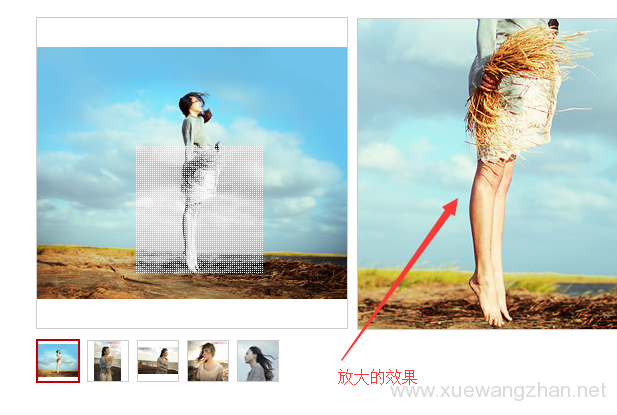
在自己做网站时,怎么制作这样的网站商品图片放大预览功能呢,下面学做网站论坛介绍一下制作方法。
<script src="js/mag.js"></script>

<script>

var obj = new mag('.show', '.bigshow','.smallshow','.mask','.bigitem');

obj.init();

</script>
<style>

/**产品图切换放大**/

.pro_details .pro_details_content .product_details {font-size: 18px;color: #777777;line-height: 40px;margin-bottom: 60px;}

.pro_details .pro_details_content .product_use {font-size: 18px;color: #777777;line-height: 30px;}

.pro_details .bg {width: 100%;height: 540px;/* overflow: hidden; */-webkit-box-sizing: border-box;box-sizing: border-box;background: #fff;display: -webkit-box;display: -ms-flexbox;display: flex;}

.pro_details .bg .m-pro_details_box {display: none;}

.pro_details .bg_left {width: 100%;height: auto;float: left;margin-right: 0px;}

.pro_details .bg_right {position: absolute;z-index: 10;left: 100%;}

.pro_details .show {width: 100%;height: 430px;margin-bottom: 10px;position: relative;-webkit-box-sizing: content-box;box-sizing: content-box;border: 1px solid #E8E8E8;cursor: move;}

.pro_details .show img {width: 100%;height: auto;max-height:100%;}

.pro_details .mask {width: 215px;height: 215px;background: #000;filter: alpha(opacity=50);opacity: 0.5;position: absolute;top: 0;left: 0;display: none;}

.pro_details .bigshow {width: 430px;height: 430px;overflow: hidden;margin-left: 10px;display: none;border: 1px solid #E8E8E8;}

.pro_details .bigshow img {width: 860px;height: 860px;margin-right: 10px;}

.pro_details .smallshow {width: 100%;height: 70px;position: relative;}

.pro_details .smallshow img {width: 100%;min-height: 100%;border: 1px solid #e8e8e8;-webkit-box-sizing: border-box;box-sizing: border-box;-webkit-transition: all 0.5s;transition: all 0.5s;}

.pro_details .smallshow>.middle_box {margin: 0 auto;width: 80%;overflow: hidden;height: 70px;}

.pro_details .smallshow .middle {overflow: hidden;-webkit-transition: all 0.5s;transition: all 0.5s;height: 70px;}

.pro_details .smallshow .middle>li {width: 70px;height: 70px;float: left;cursor: pointer;padding: 0 5px;-webkit-box-sizing: content-box;box-sizing: content-box;}

.pro_details .smallshow>p {position: absolute;top: 50%;width: 22px;height: 32px;margin-top: -16px;}

.pro_details .smallshow>.prev {left: 0;background: url(hover-prev.png) no-repeat;-webkit-transition: all 0.5s;transition: all 0.5s;}

.pro_details .smallshow>.next {right: 0;background: url(hover-next.png) no-repeat;-webkit-transition: all 0.5s;transition: all 0.5s;}

.pro_details .smallshow>.prev.prevnone {left: 0;background: url(prev.png) no-repeat;cursor: not-allowed;}

.pro_details .smallshow>.next.nextnone {right: 0;background: url(next.png) no-repeat;cursor: not-allowed;}

</style>
<div class="pro_details">

<div class="bg">

<div class="bg_left">

<div class="show">

<?php

$attachment_ids = get_post_meta($post->ID,'imgzuurl',true);

if( !empty($attachment_ids) && is_array($attachment_ids) ){?>

<img src="<?php echo wp_get_attachment_image_src( $attachment_ids[0], 'full' )[0];?>">

<?php }?>

<div class="mask"></div>

</div>


<div class="smallshow">

<p class="prev prevnone"></p>

<div class="middle_box">

<ul class="middle">

<?php

$attachment_ids = get_post_meta($post->ID,'imgzuurl',true);

if( !empty($attachment_ids) && is_array($attachment_ids) ){

$i=1;

foreach($attachment_ids as $attachment_id){ //循环图片ID

$attachment_src = wp_get_attachment_image_src( $attachment_id, 'full' );

if ( $attachment_src ){?>

<li><img src="<?php echo $attachment_src[0];?>" ></li>

<?php $i++;}

}

}?>

</ul>

</div>

<p class="next "></p>

</div>

</div>

<div class="bg_right">

<div class="bigshow">

<div class="bigitem">

<?php

$attachment_ids = get_post_meta($post->ID,'imgzuurl',true);

if( !empty($attachment_ids) && is_array($attachment_ids) ){?>

<img src="<?php echo wp_get_attachment_image_src( $attachment_ids[0], 'full' )[0];?>">

<?php }?>

</div>

</div>

</div>


</div>

</div>