从
基础 / 深入 / 实战
逐步学会建网站
很多网站都会有无缝滚动的效果,通过滚动展示图片。既有效的节约了网站版面,也增加了网站的动感效果。效果如下图:

在我们自己做网站时,也可以制作这样的网站无缝滚动效果。下面学做网站论坛介绍一下制作方法。
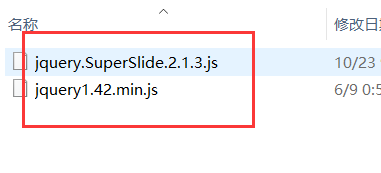
<script type="text/javascript" src="<?php echo get_template_directory_uri(); ?>/static/js/jquery1.42.min.js"></script>

<script type="text/javascript" src="<?php echo get_template_directory_uri(); ?>/static/js/jquery.SuperSlide.2.1.3.js"></script>
 <div class="picMarquee-left">

            <div class="bd">

                <ul class="picList">

                  <?php if (have_posts()) : ?>

                    <?php query_posts('cat=1' . $mcatID. '&caller_get_posts=1&showposts=10'); ?>

                    <?php while (have_posts()) : the_post(); ?>

                    <li>

                        <div class="pic"><a href="<?php the_permalink() ?>" title="<?php the_title(); ?>" target="_blank"><?php if ( has_post_thumbnail() ) { the_post_thumbnail(array('alt'=> trim(strip_tags( $post->post_title ))));} else {?><img src='<?php echo get_first_image(); ?>' alt='<?php the_title(); ?>' /><?php }?></a></div>

                        <div class="title"><a href="<?php the_permalink() ?>" title="<?php the_title(); ?>" target="_blank"><?php the_title(); ?></a></div>

                    </li>

                    <?php endwhile;?>

                    <?php endif; wp_reset_query(); ?>

                </ul>

            </div>

        </div>


        <script type="text/javascript">

        jQuery(".picMarquee-left").slide({mainCell:".bd ul",autoPlay:true,effect:"leftMarquee",vis:5,interTime:30});

        </script>
/* 无缝滚动css */

        .picMarquee-left{ width:100%;  /* 修改宽度 */margin:0 auto;overflow:hidden; position:relative;  }

        .picMarquee-left .bd{ padding:10px;   }

        .picMarquee-left .bd ul{ overflow:hidden; zoom:1; }

        .picMarquee-left .bd ul li{ width:126px;margin:0 8px; float:left; _display:inline; overflow: hidden;text-overflow: ellipsis; white-space: nowrap; text-align:center;  }

        .picMarquee-left .bd ul li .pic{ text-align:center; }

        .picMarquee-left .bd ul li .pic img{ width:120px; height:90px; display:block; padding:2px; border:1px solid #ccc; }

        .picMarquee-left .bd ul li .pic a:hover img{ border-color:#999;  }

        .picMarquee-left .bd ul li .title{ line-height:24px;   }