从
基础 / 深入 / 实战
逐步学会建网站
在之前的建站教程中,我们讲了如何制作淘宝图片放大镜功能,并给了相应的代码。这是一个固定的HTML代码,很多学习建网站的学员不懂怎么把它与Wordpress结合起来,使用动态PHP代码进行调用。
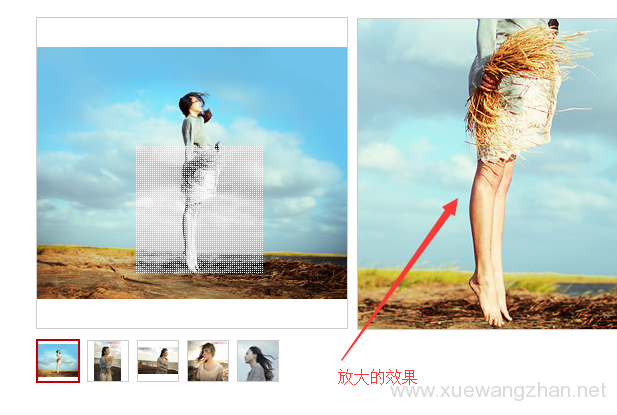
下面介绍一下Wordpress网站产品图片放大镜效果制作方法及代码。
<script src="https://cdn.bootcss.com/jquery/1.12.4/jquery.min.js"></script>

<script src="<?php bloginfo('template_directory'); ?>/images/jquery.imagezoom.min.js"></script>
/* //图片放大 */

.box{width:380px;}

.box img{vertical-align:top;border:0;}

.tb-pic a{display:table-cell;text-align:center;vertical-align:middle;}

.tb-pic a img{vertical-align:middle;}

.tb-pic a{*display:block;*font-family:Arial;*line-height:1;}

.tb-thumb{margin:10px 0 0;overflow:hidden;}

.tb-thumb li{background:none repeat scroll 0 0 transparent;float:left;height:42px;margin:0 6px 0 0;overflow:hidden;padding:1px;}

.tb-s310, .tb-s310 a{height:310px;width:380px;}

.tb-s310{max-height:310px;max-width:380px;}

.tb-s310 img{max-height:306px;max-width:376px;}

.tb-s310 a{*font-size:271px;}

.tb-s40 a{*font-size:35px;}

.tb-s40 img{width:40px;height:40px;}

.tb-s40, .tb-s40 a{height:40px;width:40px;}

.tb-booth{border:1px solid #CDCDCD;position:relative;z-index:1;}

.tb-thumb .tb-selected{background:none repeat scroll 0 0 #C30008;height:44px;padding:2px;}

.tb-thumb .tb-selected div{background-color:#FFFFFF;border:medium none;}

.tb-thumb li div{border:1px solid #CDCDCD;}

div.zoomDiv{z-index:999;position:absolute;top:0px;left:0px;width:200px;height:200px;background:#ffffff;border:1px solid #CCCCCC;display:none;text-align:center;overflow:hidden;}

div.zoomMask{position:absolute;background:url("images/mask.png") repeat scroll 0 0 transparent;cursor:move;z-index:1;}
<script type="text/javascript">

$(document).ready(function(){


    $(".jqzoom").imagezoom();


    $("#thumblist li a").click(function(){

        $(this).parents("li").addClass("tb-selected").siblings().removeClass("tb-selected");

        $(".jqzoom").attr('src',$(this).find("img").attr("mid"));

        $(".jqzoom").attr('rel',$(this).find("img").attr("big"));

    });


});

</script>
<?php

//自定义面板类的实例化

/**********title*************/

$options = array();

$boxinfo = array('title' => '参数填写', 'id'=>'ashubox', 'page'=>array('post'), 'context'=>'normal', 'priority'=>'low', 'callback'=>'');


$options[] = array( "name" => "产品缩略图上传",

            "type" => "title");


$options[] = array(

            "name" => "缩略图1",

            "desc" => "",

            "id" => "ashu_upimg01",

            "std" => "",

            "button_label"=>'上传图片',

            "type" => "media"

            );


$options[] = array(

            "name" => "缩略图2",

            "desc" => "",

            "id" => "ashu_upimg02",

            "std" => "",

            "button_label"=>'上传图片',

            "type" => "media"

            );

$options[] = array(

            "name" => "缩略图3",

            "desc" => "",

            "id" => "ashu_upimg03",

            "std" => "",

            "button_label"=>'上传图片',

            "type" => "media"

            );

$options[] = array(

            "name" => "缩略图4",

            "desc" => "",

            "id" => "ashu_upimg04",

            "std" => "",

            "button_label"=>'上传图片',

            "type" => "media"

            );

$options[] = array(

            "name" => "缩略图5",

            "desc" => "",

            "id" => "ashu_upimg05",

            "std" => "",

            "button_label"=>'上传图片',

            "type" => "media"

            );


$new_box = new ashu_meta_box($options, $boxinfo);

?>
<div class="box">


    <div class="tb-booth tb-pic tb-s310">

    <?php if ( get_post_meta($post->ID, 'ashu_upimg01', true) ) {?>

        <a href="<?php echo get_post_meta($post->ID,"ashu_upimg01",true);?>"><img src="<?php echo get_post_meta($post->ID,"ashu_upimg01",true);?>" rel="<?php echo get_post_meta($post->ID,"ashu_upimg01",true);?>" class="jqzoom" /></a>

    <?php }?>

    </div>


    <ul class="tb-thumb" id="thumblist">

    <?php if ( get_post_meta($post->ID, 'ashu_upimg01', true) ) {?>

        <li class="tb-selected"><div class="tb-pic tb-s40"><a href="javascript:void(0);"><img src="<?php echo get_post_meta($post->ID,"ashu_upimg01",true);?>" mid="<?php echo get_post_meta($post->ID,"ashu_upimg01",true);?>" big="<?php echo get_post_meta($post->ID,"ashu_upimg01",true);?>"></a></div></li>

        <?php }else{?><li class="tb-selected"><div class="tb-pic tb-s40"></div></li>    <?php }?>


        <?php if ( get_post_meta($post->ID, 'ashu_upimg02', true) ) {?>

        <li><div class="tb-pic tb-s40"><a href="javascript:void(0);"><img  src="<?php echo get_post_meta($post->ID,"ashu_upimg02",true);?>" mid="<?php echo get_post_meta($post->ID,"ashu_upimg02",true);?>" big="<?php echo get_post_meta($post->ID,"ashu_upimg02",true);?>"></a></div></li>

        <?php }else{?><li><div class="tb-pic tb-s40"></div></li>    <?php }?>


        <?php if ( get_post_meta($post->ID, 'ashu_upimg03', true) ) {?>

        <li><div class="tb-pic tb-s40"><a href="javascript:void(0);"><img src="<?php echo get_post_meta($post->ID,"ashu_upimg03",true);?>" mid="<?php echo get_post_meta($post->ID,"ashu_upimg03",true);?>" big="<?php echo get_post_meta($post->ID,"ashu_upimg03",true);?>"></a></div></li>

        <?php }else{?><li><div class="tb-pic tb-s40"></div></li>    <?php }?>


        <?php if ( get_post_meta($post->ID, 'ashu_upimg04', true) ) {?>

        <li><div class="tb-pic tb-s40"><a href="javascript:void(0);"><img src="<?php echo get_post_meta($post->ID,"ashu_upimg04",true);?>" mid="<?php echo get_post_meta($post->ID,"ashu_upimg04",true);?>" big="<?php echo get_post_meta($post->ID,"ashu_upimg04",true);?>"></a></div></li>

        <?php }?>


        <?php if ( get_post_meta($post->ID, 'ashu_upimg05', true) ) {?>

        <li><div class="tb-pic tb-s40"><a href="javascript:void(0);"><img src="<?php echo get_post_meta($post->ID,"ashu_upimg05",true);?>" mid="<?php echo get_post_meta($post->ID,"ashu_upimg05",true);?>" big="<?php echo get_post_meta($post->ID,"ashu_upimg05",true);?>"></a></div></li>

    <?php }?>


    </ul>


</div>