从
基础 / 深入 / 实战
逐步学会建网站
帝国CMS网站默认的编辑器实在是难以恭维,特别差劲是缺少图片批量上传功能。对于讲究效率的站长来说,使用帝国CMS做网站时,更换编辑器是势在必行。
前面的帝国CMS教程里介绍了帝国CMS分类信息发布页面怎么添加编辑器,下面学做网站论坛就来分享一下怎么将帝国CMS网站编辑器更换百度编辑器的方法。
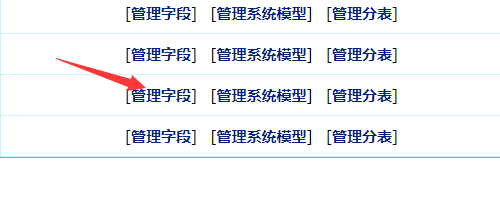
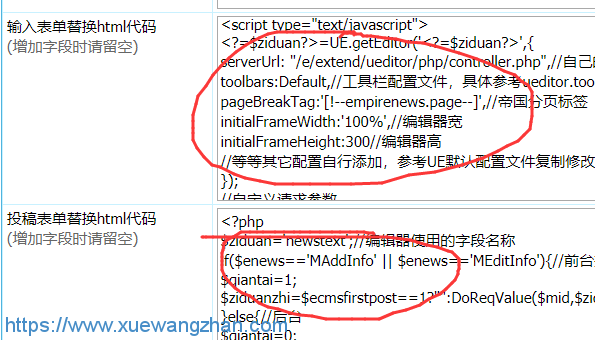
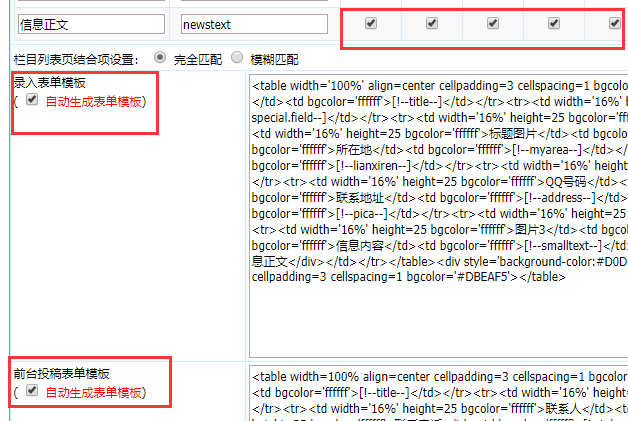
<?php
$ziduan='newstext';//编辑器使用的字段名称
if($enews=='MAddInfo' || $enews=='MEditInfo'){//前台投稿
$qiantai=1;
$ziduanzhi=$ecmsfirstpost==1?"":DoReqValue($mid,$ziduan,stripSlashes($r[$ziduan]));
}else{//后台
$qiantai=0;
$ziduanzhi=$ecmsfirstpost==1?"":stripSlashes($r[$ziduan]);
}
?>
<script>var classid='<?=$classid?>',infoid='<?=$id?>',filepass='<?=$filepass?>',ehash='<?=$ecms_hashur[ehref]?>',qiantai='<?=$qiantai?>';//把参数传给编辑器,增加支持7.2版本的金刚模式</script>
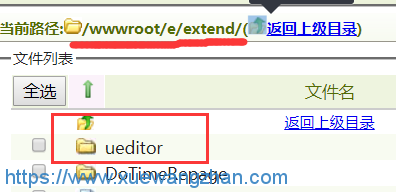
<script type="text/javascript" charset="utf-8" src="/e/extend/ueditor/ueditor.config.js"></script>
<script type="text/javascript" charset="utf-8" src="/e/extend/ueditor/ueditor.all.min.js"></script>
<script type="text/javascript" charset="utf-8" src="/e/extend/ueditor/ueditor.toolbarconfig.js"></script>
<textarea id="<?=$ziduan?>" name="<?=$ziduan?>"><?=$ziduanzhi?></textarea>
<script type="text/javascript">
<?=$ziduan?>=UE.getEditor('<?=$ziduan?>',{
serverUrl: "/e/extend/ueditor/php/controller.php",//自己的请求接口
toolbars:Default,//工具栏配置文件,具体参考ueditor.toolbarconfig.js文件中说明
pageBreakTag:'[!--empirenews.page--]',//帝国分页标签
initialFrameWidth:'100%',//编辑器宽
initialFrameHeight:300//编辑器高
//等等其它配置自行添加,参考UE默认配置文件复制修改即可
});
//自定义请求参数
<?=$ziduan?>.ready(function(){
<?=$ziduan?>.execCommand('serverparam',{
'filepass':'<?=$filepass?>',//修改时候是信息ID
'classid' :'<?=$classid?>',
'qiantai':<?=$qiantai?>
});
});
</script>
<table width="100%" border="0" cellpadding="3" cellspacing="1" bgcolor="#DBEAF5">
<tr>
<td bgcolor="#FFFFFF"> <input name="dokey" type="checkbox" value="1"<?=$r[dokey]==1?' checked':''?>>
关键字替换 <input name="copyimg" type="checkbox" id="copyimg" value="1">
远程保存图片(
<input name="mark" type="checkbox" id="mark" value="1">
<a href="SetEnews.php" target="_blank">加水印</a>)
<input name="copyflash" type="checkbox" id="copyflash" value="1">
远程保存FLASH(地址前缀:
<input name="qz_url" type="text" id="qz_url" size="">
)</td>
</tr>
<tr>
<td bgcolor="#FFFFFF"><input name="repimgnexturl" type="checkbox" id="repimgnexturl" value="1"> 图片链接转为下一页 <input name="autopage" type="checkbox" id="autopage" value="1">自动分页
,每
<input name="autosize" type="text" id="autosize" value="5000" size="5">
个字节为一页 取第
<input name="getfirsttitlepic" type="text" id="getfirsttitlepic" value="" size="1">
张上传图为标题图片(
<input name="getfirsttitlespic" type="checkbox" id="getfirsttitlespic" value="1">
缩略图: 宽
<input name="getfirsttitlespicw" type="text" id="getfirsttitlespicw" size="3" value="<?=$public_r[spicwidth]?>">
*高
<input name="getfirsttitlespich" type="text" id="getfirsttitlespich" size="3" value="<?=$public_r[spicheight]?>">
)</td>
</tr>
</table>